
Automate the follow-up. Play for won and paid.
ConvertX automates first replies, assignment, reminders and overdue escalation, so follow-up runs on rules, not memory. Digital 4 Jesus sets it up to measure closed deals and money received, not enquiry counts.
 Watch the full ConvertX walkthrough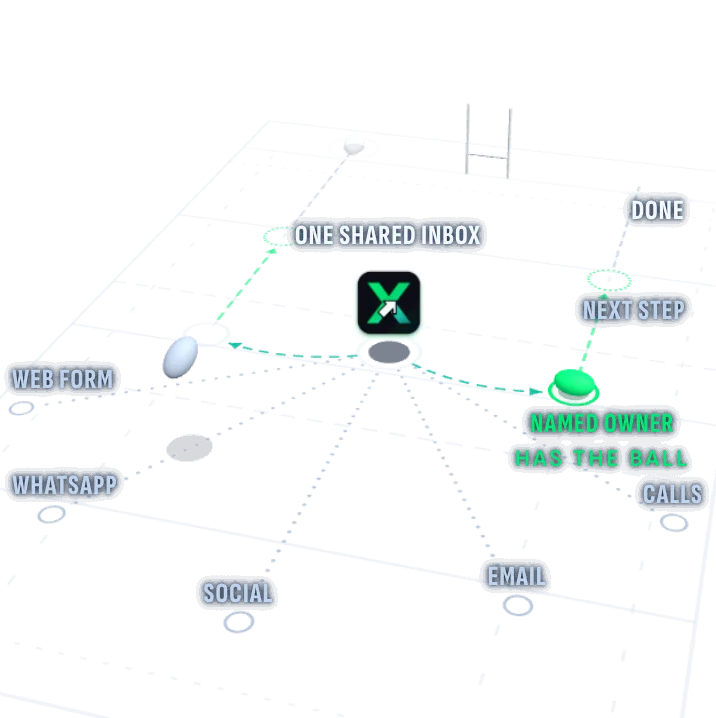
ConvertX in a nutshell
- CaughtAn automatic first reply and a named owner for each enquiry from your connected channels.
- ChasedA next step with a deadline. Rules send reminders and alert a named person when it stalls.
- ClosedTrack won work and confirmed payment separately. Judge the play by closed deals and money received.
The enquiry came in. The deal still needs closing.
Someone sees your advert or website and sends a WhatsApp message.
It lands on one person’s phone while they’re out on a job.
Two colleagues each assume the other one replied.
The quote goes out days later, or not at all.
Money in the bank. That is the scoreboard.
We configure the first response, assignment and timed follow-up. If an action is overdue, it stays visible and an alert goes to the named person or manager agreed in your setup. Your team handles the conversation and the decisions; nobody has to remember to set the next reminder. We judge the setup by deals closed and money received, not a bigger enquiry count.
The play ends at won and paid.
Six steps from being found to confirmed payment. We configure the routine actions and escalation; your people own the decisions. The board shows progress, not a promise that every enquiry will buy.
Step 1: Found
Someone finds your business through search, an advert, your website or a referral.
- Who has the ball
- Your marketing team or Digital 4 Jesus, as agreed.
- What ConvertX does
- Connected forms and source records give supported enquiries a route into your sales process.
- The human part
- Website, advertising and SEO work are separately scoped. More traffic is useful only if the follow-up works.
Step 2: Enquiry
The enquiry lands with its conversation history, ready for the configured rules to run.
- Who has the ball
- The person assigned by your routing rules.
- What ConvertX does
- A shared inbox for connected channels and automatic assignment to a named owner.
- The human part
- We agree routing and a fallback owner before go-live, including what happens when someone is away.
Step 3: Auto reply
An automatic first response confirms the enquiry arrived and tells the customer what happens next.
- Who has the ball
- The assigned owner, ready to pick up the conversation.
- What ConvertX does
- The agreed acknowledgement and a next action with a deadline, triggered on supported connected channels.
- The human part
- Your team answers questions and makes decisions. We agree message timing, consent and stop rules with you.
Step 4: Follow-up
The quote, booking or signature has a next step and a deadline. Nobody has to remember to set a reminder.
- Who has the ball
- The opportunity owner, with a named person or manager for escalation.
- What ConvertX does
- Rules send follow-up and reminders. Overdue actions stay visible and trigger the agreed escalation.
- The human part
- People handle exceptions and key conversations. Work stays on the board until it is won, lost or paid; follow-up stops under the agreed rules.
Step 5: Won
A signed agreement or confirmed booking is a closed deal. An unanswered quote is not.
- Who has the ball
- Your team, confirming the evidence for the Won stage.
- What ConvertX does
- A separate Won stage records closed work, using the definition and evidence agreed for your business.
- The human part
- Your team still closes and delivers the work. Automation does not promise a sale.
Step 6: Paid
Won is not the same as paid. Confirm money received before counting paid work.
- Who has the ball
- The person responsible for checking payment.
- What ConvertX does
- A Paid stage records confirmed receipt, from an authorised staff update or a supported, separately scoped connection.
- The human part
- We agree how receipt is checked. Payment and invoice workflows depend on support; banking and accounting connections are separately scoped.
A connected process, with people accountable.
Digital 4 Jesus plans, configures and supports ConvertX. Website, advertising and search work can be scoped alongside it, so the team bringing enquiries in works to the same closed-deal and paid-work goals as the team following them up.
Meet Dewaldt Huysamen on the Digital 4 Jesus websiteSee the follow-up system behind the play.
About 11 minutes inside a configured example, including workflow automation, the sales pipeline and a paying-client feedback example.

The player didn’t load.
It may be blocked on this network. Try again, or ask us to take you through it.
Full time.
Show us where follow-up stalls in your business. We will work out the rules, owners and costs with you.
Chapters
Length 11:04
It shows a configured example. Your setup is agreed with you, so not every module, channel or assistant in the recording is part of every plan. The paying-client feedback example illustrates a configured outcome, not a result every business will see.
The work behind a closed deal.
Five areas of work, set up around your process. What is switched on for you depends on what we agree, and we test it with your team before anything goes live.
Conversations and context
- The situation
- A customer messages, then phones, then emails a document.
- What is set up
- Contact records with conversation history, and a shared inbox for the channels supported in your setup.
- What your team gets
- Whoever picks it up sees the whole story, not a fragment of it.
Ownership and follow-up
- The situation
- Three people saw the enquiry. Nobody was sure who would reply.
- What is set up
- Automatic assignment, timed tasks, follow-up reminders and overdue escalation under agreed rules.
- What your team gets
- The owner knows what is due. A named person or manager is alerted if it stalls.
Appointments and documents
- The situation
- Booking a time takes a string of messages, and the quote waits for a signature.
- What is set up
- Appointment calendars and reminders where your calendars are connected and tested, plus documents and electronic signing with the right recipients and fields.
- What your team gets
- Less back and forth to book, quote or sign.
Reputation and keeping in touch
- The situation
- The job went well, but nobody asked for a review or stayed in touch afterwards.
- What is set up
- Review and feedback requests, social scheduling and email campaigns, where they are enabled and permitted.
- What your team gets
- Staying in touch without a separate tool for every message.
Learn from closed and paid work
- The situation
- You can see what the adverts cost, but not which enquiries became customers.
- What is set up
- Source-to-outcome reporting for Won and Paid stages, using the records and supported connections agreed in your setup. Learn which sources bring paying customers.
- What your team gets
- See which sources lead to closed deals and confirmed payments, not only which adverts get enquiries.
Available configuration is not the same as a feature already running in your business. Channels, integrations and measurement depend on what each service supports and on the quality of the data, so we confirm them during scoping rather than promise them upfront.
We set the rules. Your team knows the play.
Your team should not have to build its own follow-up system. Digital 4 Jesus configures and tests the agreed process with them, trains the people using it and stays on to support it. People still own the key passes.
We don’t promise a launch date before we have seen your process. Timing depends on the scope, the access we need and your team’s availability.
Understand your offer and process
How enquiries reach you today, who handles them and where they tend to stall.
Agree the scope and costs
What is included, what is separate and who does what, settled before any setup starts.
Set the rules
First replies, owners, deadlines, reminders, escalation and stop rules, plus the evidence needed to mark work Won or Paid.
Test with your team
Work through a new enquiry, a missed deadline and an exception with the people using it, before go-live.
Onboard and train
The people doing the work learn the system they will use every day.
Review closed and paid work
Use recorded outcomes to see where deals stall and which sources bring paying customers. Adjust the rules or marketing from that evidence.
What it costs, in plain terms.
After a short call, we quote the set-up fee and monthly fee for your team, channels and sales process. Advertising spend and usage are separate. You see what is included before implementation starts.
Discuss your setup on the Digital 4 Jesus websiteYour setup, line by line
- Implementation and supportA set-up fee and a monthly fee for the scope, training and ongoing support we agree with you.Quoted upfront
- Advertising budgetYour media spend with the advertising platforms, kept separate from our fees.Paid to platforms
- Usage and enabled servicesMessaging, calls, subscriptions and other usage for the services you switch on.Varies with use
- Bespoke extensionsCustom assistants, agents and integrations, when you need them.Scoped separately
Agreed with you before implementation starts. No usage is unlimited, and nothing on this sheet is a fixed public tariff.
Before you change your follow-up.
What if my team will not use another system?
We configure the daily process with the people who will use it, test it together and train them before go-live. First replies, assignment and reminders run under agreed rules. People still need to handle conversations, record outcomes and act on escalations. Overdue work stays visible to the agreed owner or manager.
We already use WhatsApp. Why would we need this?
WhatsApp carries the conversation. ConvertX adds an owner, a next step, a deadline and follow-up rules around supported connected messages. We check your number, account eligibility, permissions and channel costs during scoping. We do not promise that every existing number or tool can connect.
What does it cost?
We quote a set-up fee and monthly fee after a short call about your team, channels and process. Advertising spend, messaging, calls, enabled subscriptions and other usage are separate. Custom assistants and integrations are separately scoped. There is no single public package price.
Do you measure enquiries or money in the bank?
We set up reporting around deals closed and money received. Won and Paid are separate stages, with an agreed way to verify each. Source-to-outcome reporting depends on complete records and supported connections. An enquiry, a click or an issued invoice is not proof of payment.
Can Google and Meta optimise for paying customers?
That can be a separately scoped extension. With the required consent, matching identifiers and a tested connection, verified paid outcomes can be sent back to Google or Meta to help campaigns optimise for buyers rather than form-fillers. It is not included by default and does not promise advertising results.
Does ConvertX collect payments or connect to our bank?
Do not assume either is included. Payment and invoice workflows can be configured where supported. Banking and accounting connections require separate scoping. We can agree an authorised staff confirmation of receipt where there is no supported connection; a deal is not marked Paid merely because an invoice was sent.
Is everything after the enquiry automatic?
The agreed routine steps are: the first response, assignment, next-action deadlines, reminders and escalation. We configure and test those rules for your connected channels. Your people still sell, make judgement calls, confirm outcomes and deliver the work. Lost deals and opt-outs have stop rules; automation is not a promise of zero losses.
Can we keep our existing website and tools?
Often, yes. We check your forms, channels and systems before agreeing the scope. A connection depends on what each service supports and the access available. Voice and chat assistants and document-review agents need their own scope, usage budget and route to human review.
How is customer information handled?
We agree what information is collected, who may see it and which workflows are permitted, then configure access accordingly. Your business remains responsible for its use of customer information and its POPIA obligations. The software alone does not make a business compliant.
Can I see a demonstration?
Yes. The full walkthrough, about 11 minutes long, is on this page. Use Discuss your setup if you would rather talk through your process.
Put won and paid on your scoreboard.
Show us where follow-up stalls. We will work out the rules, owners and costs with you.
What happens after you click
It helps to know how enquiries arrive, who follows up and which tools you use.
The discussion form is on the Digital 4 Jesus website.
Already a ConvertX client? Log in to your account